Amazon OTP Verification: Account Access and Missing Codes
By SMSOTPS Support Team
Amazon asks for a code because a password alone does not prove you control the account.
That sounds obvious until you are staring at a screen that will not move. Amazon's help material for Two-Step Verification describes the code as a one-time password, distinct from your account password, sent by text message, voice call, or an authenticator app. You manage the phone number for that check in Login & Security. That is the verified core, and it is enough to understand the job: Amazon wants proof that the person signing in controls the contact method on the account, not just knowledge of a password.
For a shopping account, that check shows up at sign-in, at account creation, when you change security settings, and when Amazon flags a login or purchase as needing an extra check. For other Amazon account types, the trigger points differ. Do not assume a seller or cloud flow matches a shopping flow.
What this guide could not verify about Amazon's own screens
Amazon's own help material was checked in this pass only as far as search results reached it, including its KDP help page on Two-Step Verification. Amazon's main consumer shopping sign-up screens were not opened and confirmed in full.
So this guide does not state, as fact, the exact fields on a shopping sign-up screen, the exact order of those screens, whether an email code is offered in your particular flow, how many digits a given Amazon code has, or how many minutes a given code stays valid. Third-party pages disagree on those details, and guessing would turn this guide into another confident-sounding page with invented specifics.
If you need the exact screen for your account, open Amazon's official help for your account type and follow what it shows you in that moment. That is the only source that counts for Amazon's own flow.
When the code does not arrive
Start with the destination, not the resend button.
Amazon shows you, in some flows, the last digits of the number it is trying to reach. Read them. If those digits belong to a number you no longer use, no amount of resending will help. The code is going to the wrong place, and the fix is in your account settings - if you still have access - or through Amazon's official recovery route if you do not.
If the destination looks right, work through the boring checks Amazon forum staff themselves list for this problem: network connection, the phone number on file in Login & Security, a full or filtered message inbox, a restart of the phone, and whether messages from Amazon are blocked or filtered. One of those explains a surprising share of missing codes.
Only then request a new code, once. Hammering resend creates a pile of codes and a pile of confusion about which one is current. If a code arrives after you have already requested a fresh one, use the newest one and discard the rest. Never enter a code you did not request. If a code arrives out of nowhere, do not type it in anywhere. Change your password through Amazon's official route and contact Amazon support - that unsolicited code is a warning sign, not a shortcut.
If the code still does not arrive, stop and change the question. The question is no longer "how do I make this code arrive?" It is "is the number on this account still a number I control?" If the answer is no, the recovery route matters more than another resend. If the answer is yes and the number is correct, Amazon support is the next step, not a third-party workaround.
That order - destination, number on file, filtering, one fresh request, recovery - is the whole missing-code section. Most guides bury it under pages of internal mechanics. It belongs first, because it is what a person locked out at midnight actually needs.
A virtual number, later in the decision - not first
Only now does a virtual number enter the picture, and only as one option: completing Amazon's phone verification with a number other than your personal number.
Read the trade-off before you buy anything.
If Amazon asks for that number again - a new device, a fresh login, a recovery check - and you no longer control the virtual number, you face a lockout. A disposable number expires. The Amazon account does not automatically follow you to a new number. For an account holding orders, payment methods, and purchase history, that is a serious cost, and it outweighs the privacy gain for any account you plan to keep.
Use a virtual number only for an account you are willing to lose, or for an account where you know you can change the number to one you control later. For a main Amazon account, use a number you will still control in six months. That is not a footnote. That is the decision.
This is also where the framing needs to be exact. You are not removing phone verification. You are still completing Amazon's OTP step. You are doing it with a virtual number instead of your personal SIM. Amazon still decides whether that number is accepted for that account, in that country, on that day. No seller page can promise otherwise, and this one does not.
How it works on SMSOTPS
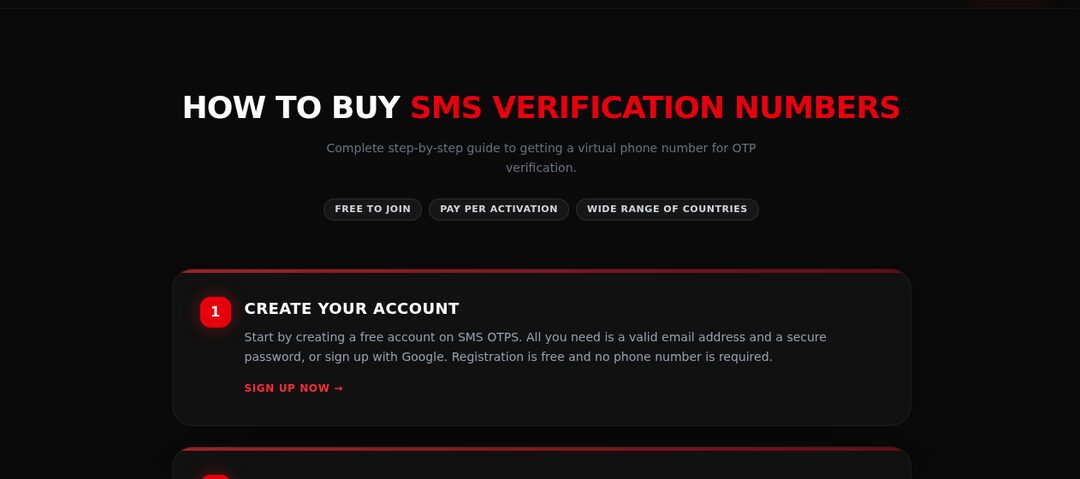
Top up your SMSOTPS balance first, then choose the service and the country, then buy a number. The SMS code appears in your dashboard. Enter that number in Amazon where Amazon asks for a phone number, request the code from Amazon, read the code in your dashboard, and enter it in Amazon.
Check the live order page for current price and stock before you top up - this guide quotes no price, because price and stock change, and a stale number in an article helps nobody. The how SMSOTPS orders work page covers the order flow in detail.
What happens to your money - exactly
Your balance is charged when the number is ordered, at the price shown at that moment, not when the code arrives. That timing matters, because a missing code does not mean an uncharged order.
What happens next depends on the kind of order you placed. Refund and cancellation rules differ between standard orders and link-based orders, and the exact current rules - the self-cancel window, the refund on expiry, what a link-based order forfeits - live in the FAQ and the terms. Those are the version that counts on the day you buy, not this article. One reader, one account, one standard order.
Top-ups are a separate step with their own payment-processor fee, shown at the payment step before you confirm. Treat that fee as spent, whatever happens to the order later.
Mistakes that waste a number and a login attempt
- Building a must-keep Amazon account on a number you will not control next month.
- Buying before checking live stock for Amazon and your country, then topping up for a service that is not available.
- Choosing the wrong service or country on the order screen, then blaming the code.
- Requesting code after code without checking the destination digits or the number on file first.
- Buying a link-based order and expecting standard auto-refund and self-cancel terms.
- Sharing a code with anyone, including someone claiming to be support. Amazon does not ask you for your code that way, and a shared code is a handed-over account.
My recommendation
If the account is disposable or you can change its number later, and you have checked live stock, buy one standard order for Amazon and your country, keep your dashboard open, and know the cancel and refund rules for your order type - the FAQ states the current ones.
If the account matters and you cannot change the number later, do not build it on a disposable number. Use a number you control long-term, complete Amazon's OTP step with that number, and treat the privacy trade-off honestly: keeping access to your own account beats keeping your personal number out of one sign-up form.
Before you spend anything, check Amazon's official help for your account type, then check the live order page for Amazon stock in your country. Decide, before you enter any code, whether this is an account you are willing to lose.
Common questions
Why does Amazon ask for a code?
Amazon's help material for Two-Step Verification describes the code as a one-time password, distinct from your account password, sent by text message, voice call, or an authenticator app. Amazon wants proof that the person signing in controls the contact method on the account, not just knowledge of a password.
What should I check first when the Amazon code does not arrive?
Start with the destination, not the resend button: read the last digits Amazon shows and confirm they belong to a number you still use. Then check network connection, the phone number on file in Login & Security, a full or filtered message inbox, and whether messages from Amazon are blocked. Only then request a new code, once.
Should I enter an Amazon code I did not request?
No. Never enter a code you did not request, and never share a code with anyone claiming to be support. An unsolicited code is a warning sign: change your password through Amazon's official route and contact Amazon support.
Can I use a virtual number for Amazon verification?
Some people complete Amazon's phone verification with a virtual number instead of their personal SIM. Amazon still decides whether that number is accepted, and if you no longer control the number when Amazon asks again, you face a lockout. Use one only for an account you are willing to lose or can move to a number you keep.
What happens to my money if no code arrives on a virtual order?
It depends on the order type. Refund and cancellation rules differ between standard and link-based bulk orders, and the current rules are stated in the SMSOTPS FAQ and terms - those are the version that counts on the day you buy. For one account, use a standard order.
Related articles
 BigBasket Account Guide: Sign-Up, OTP and Recovery For BigBasket sign-up: what it asks for, the refund rules if no code arrives, and the lockout risk to weigh first.
 What Is an OTP? One-Time Passwords Explained For first-time readers: verification codes and their expiry timers.
 How to Receive SMS Online Safely For understanding privacy: public shared inboxes compared with private verification numbers.